Free SSH Client for Mac — No Subscription, No Account Required
Your Mac already ships with ssh in Terminal.app, so why install an SSH client? Because managing more than a couple of servers from a bare terminal means juggling ~/.ssh/config, remembering tunnel flags, and switching to a separate SFTP tool for files. WebSSH gives you a native Mac app with saved connections, an SFTP browser, one-click port forwards and a proper terminal — for free, with no subscription and no account to create.
What Is WebSSH?
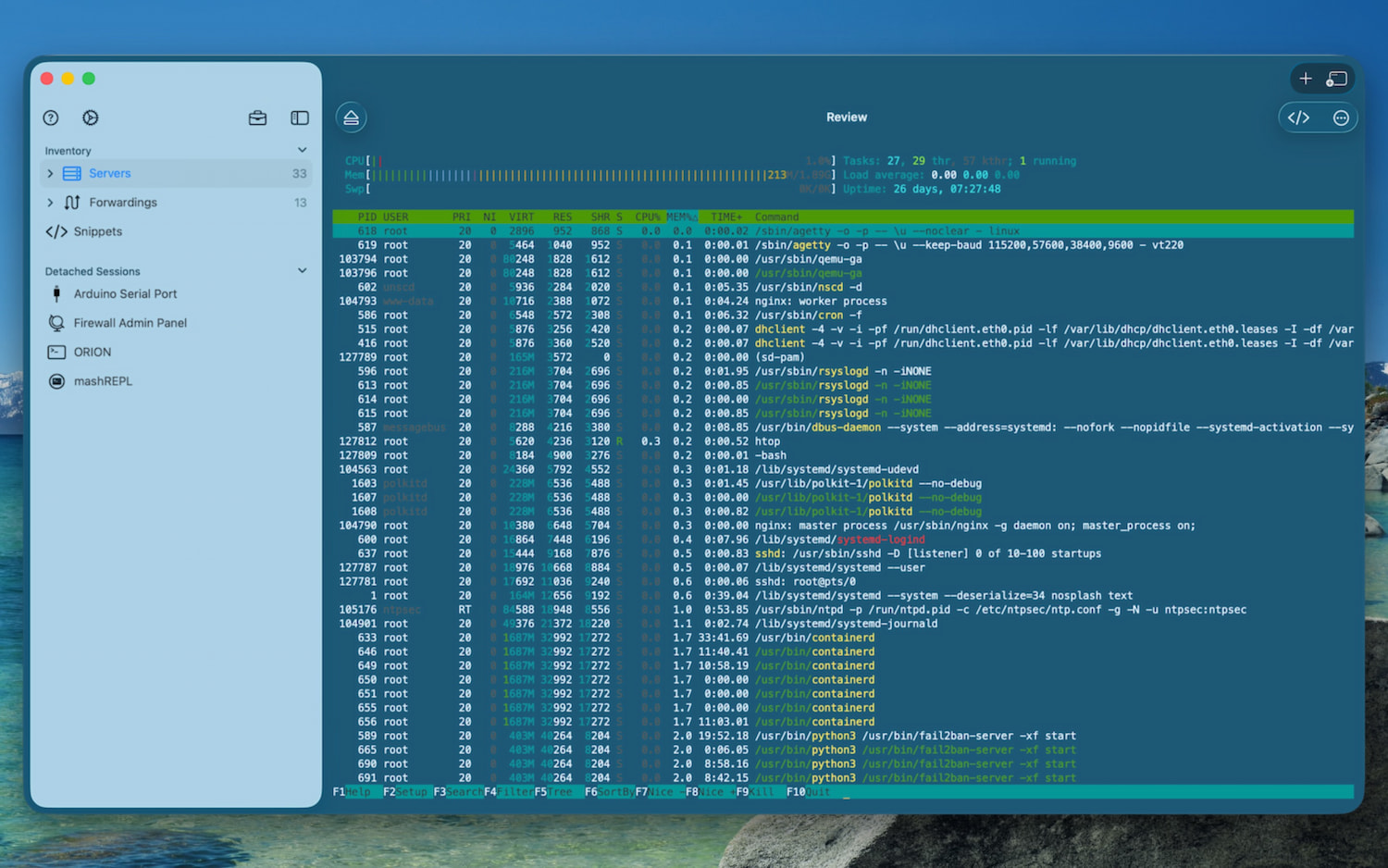
WebSSH is an SSH, SFTP, Telnet, Mosh and serial client for Mac, iPhone and iPad, developed since 2012 by an indie developer. The Mac version is a native Mac app built from the same codebase as the iOS version, so it has a real menu bar, window tabs, keyboard shortcuts and right-click menus, not a stretched phone interface.
All connections are direct: your credentials and session data go straight from your Mac to your server, never through a third-party relay. WebSSH is available for free on the App Store, and a single download covers Mac, iPhone and iPad under one Apple ID.
Terminal.app Already Has SSH. Why Use a Client?
If you connect to one server once in a while, Terminal.app is fine. WebSSH earns its place when you manage several hosts, move files around, or want more than a blank black window:
- Saved connections: host, port, user, key, 2FA and port knocking stored once, opened with a click or a shortcut
- SFTP browser: browse, edit, upload and download files in a graphical view, with drag and drop
- Port forwarding without flags: define local and dynamic (SOCKS) tunnels once and start them from the sidebar
- Split panes with broadcast: run the same command on several servers side by side
- Snippets: save frequently used commands and fire them with
⌥⌘1to⌥⌘9 - 425 color schemes and bundled Nerd Fonts: every iTerm2 theme is included, plus FiraCode, Meslo, Hack, Iosevka and more
- Session recording: record a session in asciinema
.castformat for documentation or post-mortems - iCloud sync: the connections you set up on your Mac appear on your iPhone and iPad, through your own iCloud account
WebSSH is a complement to Terminal.app rather than a replacement for it: keep using the shell you love locally, and let WebSSH handle the remote hosts.
Built for the Mac
The Mac version of WebSSH is not a port that ignores the platform. It uses the features Mac users expect:
Menu Bar, Windows and Tabs
Open a new window with ⌘N or a new tab with ⌘T. Tabs are real macOS window tabs: switch with ⌘1 to ⌘8, jump to the last one with ⌘9. Window position and size are restored when you relaunch the app. See launching multiple terminals for the details.
Split Panes
Split a terminal vertically with ⌘D, horizontally with ⇧⌘D, or into four panes with ⌥⇧⌘D. Move focus between panes with ⌥⌘ and the arrow keys, and turn on Broadcast Input (⌥⌘B, Pro) to type into every pane at once. See split panes and Broadcast Input for the details.
Keyboard and Trackpad
Search the terminal buffer with ⌘F, zoom with ⌘+, ⌘- and ⌘0, or pinch on the trackpad to change the font size. Right-click in the terminal for a context menu, or set right-click to paste directly. Right-click a connection in the sidebar to edit, clone or delete it.
Drag and Drop
Drop a file onto a terminal to upload it to the current remote directory (Pro). The SFTP browser supports drag and drop in both directions.
Serial Port Client (Mac only)
Plug in a USB-to-serial adapter and WebSSH turns into a serial console for routers, switches, Raspberry Pi boards and embedded devices, with configurable baud rate, parity, stop bits and flow control. This feature is only available on the Mac.
Built-in API / MCP Server (Mac only)
WebSSH for Mac includes a local API / MCP server. AI applications such as Claude Desktop, or your own scripts, can list your terminal sessions, read what is on screen and send commands, all protected by a bearer token and running only on your Mac. This feature is only available on the Mac.
Touch ID Lock
Lock WebSSH with Touch ID or a password, and have it lock itself after a delay so a shared or unattended Mac does not expose your servers.
Sysadmin Tools in the Menu Bar
The Tools menu gives you Ping, Traceroute, Whois, DNS Lookup, your public and local addresses, a certificate checker, a web browser for tunneled web interfaces, and mashREPL, a local offline shell.
Full Feature Set
Protocols
- SSH: encrypted shell sessions to Linux, Unix, macOS, network gear and more
- SFTP: complete remote file management
- Telnet: legacy devices and older network hardware
- Mosh: roaming sessions that survive sleep and network changes, free
- Serial: direct console access over USB-to-serial adapters (Mac only)
Authentication
- Password authentication
- Challenge-response / two-factor authentication (2FA)
- Ed25519, ECDSA and RSA private keys
- In-app key generation, exported in OpenSSH or PuTTY format
- PuTTY Private Key (.ppk) import
- Port Knocking
- Jump hosts (Pro)
Networking
- Local port forwarding and dynamic SOCKS proxies, started from the sidebar
- Alternative addresses per host, such as a LAN IP at home and a public hostname elsewhere (Pro)
- Wake-on-LAN, including IPv6
- Proxmox dashboard over SSH
Terminal
- xterm-256color emulation with GPU-accelerated rendering
- Inline images (SIXEL and iTerm2 protocol) and progress bars (OSC 9;4)
- Clipboard integration through OSC 52, with your approval
- tmux, screen and Zellij friendly key handling
- 425 iTerm2 color schemes and a theme editor
Free vs. Pro: What You Get
The free version of WebSSH includes every feature above. The only restriction is that you can save one connection at a time.
WebSSH Pro removes that limit, giving you unlimited saved connections, plus jump hosts, broadcast input, drag-and-drop uploads and unlimited snippets. It's a one-time purchase with no subscription, and it supports Family Sharing. One purchase covers all your Apple devices — Mac, iPhone and iPad — using the same Apple ID.
For details, see the pricing page.
Privacy: Your Servers Stay Yours
- No account: there is no sign-up and no login
- No analytics: WebSSH embeds no tracking or analytics SDK, and its App Store privacy label declares no tracking
- Direct connections: sessions go from your Mac to your server, never through a WebSSH relay
- iCloud sync is opt-in: when you enable it, your data is stored in your own private iCloud database, which WebSSH the company never sees
Getting Started on Mac
- Download WebSSH from the Mac App Store
- Press
⌘Nor click + to create a connection - Enter the hostname or IP address, port (default: 22), username and authentication method
- Click Connect
The first time you connect to a device on your local network, macOS asks whether WebSSH may access the local network. Accept it; if you declined by mistake, see can't connect anymore on macOS to re-enable it in System Settings.
Frequently Asked Questions
Is WebSSH free to use on Mac?
Yes. You can download and use WebSSH on your Mac for free with full feature access. The only limitation is one saved connection at a time. The Pro upgrade (one-time purchase, not a subscription) removes this limit.
Do I need to create an account to use WebSSH on Mac?
No. There is no sign-up and no login. Your connections, keys and settings live on your Mac, and you can optionally sync them to your iPhone and iPad through your own iCloud account. WebSSH never sees them.
Why use WebSSH instead of Terminal.app?
Terminal.app is excellent for a single ssh command. WebSSH adds saved connections, a graphical SFTP browser, one-click port forwards, split panes with broadcast input, snippets, session recording and iCloud sync with your iPhone and iPad. Many users keep both.
Which macOS versions does WebSSH support?
WebSSH requires macOS 26 or later.
Does WebSSH run on Apple Silicon and Intel Macs?
Yes. WebSSH is a universal Mac app that runs natively on Apple Silicon (M-series) and on Intel Macs that support macOS 26.
Does WebSSH support tabs and keyboard shortcuts on Mac?
Yes. Open a new tab with ⌘T, a new window with ⌘N, switch tabs with ⌘1 to ⌘8 and jump to the last tab with ⌘9. Split panes, search, zoom and snippets all have shortcuts in the menu bar.
Can I use WebSSH as a serial console on Mac?
Yes. WebSSH for Mac includes a serial port client with configurable baud rate, parity, stop bits and flow control. Serial is available on the Mac only, not on iPhone or iPad.
Can I use WebSSH with Claude Desktop or other AI tools?
Yes. WebSSH for Mac includes a local API / MCP server. Once enabled in WebSSH settings, MCP clients such as Claude Desktop can read your terminal sessions and send commands. It runs only on your Mac and is protected by a token.
Does buying WebSSH Pro on iPhone also cover my Mac?
Yes. WebSSH Pro is a universal purchase. One payment through the App Store unlocks Pro on all devices sharing the same Apple ID, including Mac, iPhone and iPad.
Can I sync my connections between Mac, iPhone and iPad?
Yes. Enable iCloud sync in WebSSH settings on each device and your connections, keys and settings stay in sync through your own iCloud account. Sync is off by default.
Related Guides
- Free SSH Client for iPhone
- Free SSH Client for iPad
- Launching multiple terminals
- Split panes and Broadcast Input
- Snippets and keyboard shortcuts
- API / MCP Server for macOS
- Port Forwarding
- Public / Private Key Authentication
- Keyboard Shortcuts & Combo Keys
- iCloud Sync
- Best SSH Client for iOS Without a Subscription
Download WebSSH for Mac
Free to download. No subscription. Works on every Mac running macOS 26 or later.
Download on the Mac App Store →